
iCoder CPT RVU ICD10 HCPCS NDC
StarInixMedical
4.36.00 Reviews
- Version
- 2.0.3
- Installs
- 10.00K
- Age Rating
- Everyone
Screenshots
Our Review of iCoder CPT RVU ICD10 HCPCS NDC
 Analysis by Appyee
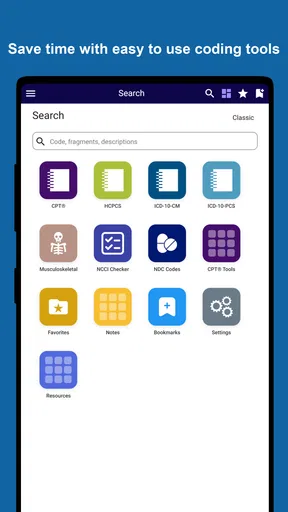
I found iCoder CPT RVU ICD10 HCPCS NDC to be a focused medical reference app rather than a general health tool. Its purpose is to bring several coding and reimbursement-related resources into one mobile workspace, including CPT-4, RVU, ICD-10-CM, ICD-10-PCS, HCPCS, orthopedic references, lab fees, and NDC information. That combination makes it most relevant to people who already work with clinical coding, billing, documentation, or medical administration.
My first impression was that this is an app built around quick lookup, not patient education. It does not try to explain medicine in a friendly consumer format. Instead, it points toward the terminology and code families used behind claims, procedure records, diagnoses, supplies, medications, and valuation. If you regularly need to check a code while away from a desktop, that narrow focus can be useful. If you are simply trying to understand a diagnosis or prescription, it is probably the wrong kind of medical app.
What the app brings together for medical coding work
StarInix is the developer behind this medical app, which has been available since early January 2022. The current release is version 2.0.3 and requires Android 8.0 or later. Its age rating is Everyone, but the practical audience is much more specialized than that label suggests. The rating describes suitability of content, not the level of knowledge needed to use the material correctly.
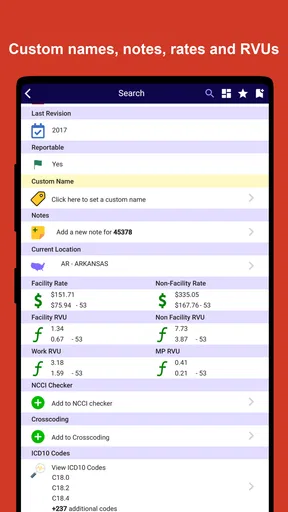
The app’s scope is its clearest selling point. CPT-4 and HCPCS can matter when identifying procedures, services, equipment, and supplies. ICD-10-CM and ICD-10-PCS serve different coding purposes, so having both named within the same reference can reduce the need to jump between unrelated tools. RVU information adds a reimbursement and valuation angle, while orthopedic, laboratory-fee, and NDC references broaden the app beyond a basic diagnosis-code browser.
That breadth is useful, but it also creates an important distinction: a collection of references is not the same thing as a complete coding workflow. I would treat this app as a supporting lookup tool. I would not let a quick result replace payer guidance, organizational policy, official coding manuals, or review by a qualified professional when a claim has financial or compliance consequences.
How I would use it during a normal workday
Imagine a biller reviewing a procedure note and encountering terminology that needs checking before a claim is prepared. Instead of opening separate references for the procedure family, diagnosis terminology, supply code, and medication identifier, the user can start with the relevant section in this app. That does not remove the need to interpret the documentation, but it can make the first research step more convenient.
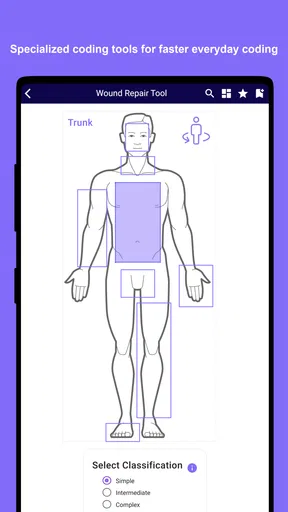
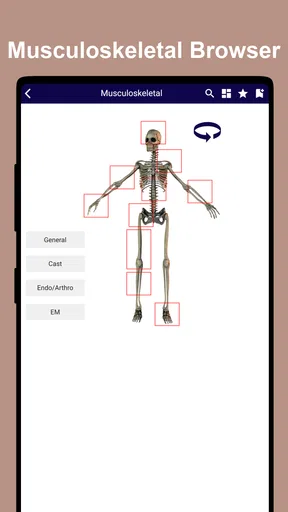
A similar situation could occur in an orthopedic office. A staff member may need to move between a procedure reference and a diagnosis reference while checking whether the documentation supports the intended coding path. The orthopedic material is especially relevant here because it gives the app a more practical angle than a single broad code index. Still, I would verify any final selection against the current rules and the specific payer requirements rather than relying on a mobile result alone.
For a laboratory setting, the lab-fee reference may be more useful than the general medical sections. For pharmacy-related administrative work, NDC information can provide a starting point when identifying a product. These are different tasks, and the app’s value comes from placing them near one another rather than forcing every user to maintain several unrelated references.
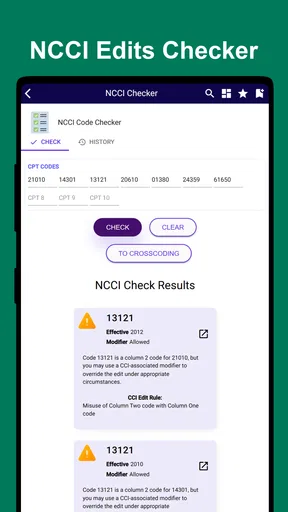
One useful habit is to separate searching from deciding. I would use the app to locate possible entries, then compare the wording with the actual documentation and confirm whether the code set, setting, modifier logic, and payer rules fit. This two-step approach is more reliable than treating the first matching phrase as the answer.
What the different reference areas mean in practice
The terminology can be confusing even for people who work in healthcare administration. CPT-4 generally relates to professional procedures and services, while HCPCS extends coding into additional services, products, equipment, and supplies. ICD-10-CM is associated with diagnoses used in many clinical and billing contexts, whereas ICD-10-PCS is used for inpatient procedure coding. RVU information is not another diagnosis or procedure code; it relates to relative valuation and can help users understand how services are weighted.
That separation matters because searching the right family is often more important than finding a familiar word. A user who searches only by everyday language may still need to decide whether the result belongs to a diagnosis, professional service, inpatient procedure, supply, or medication identifier. The app can support that process, but it cannot replace the judgment needed to classify the underlying record correctly.
The inclusion of NDC and lab fees also introduces a trade-off. It is convenient to have those subjects in the same place, but they do not follow exactly the same logic as diagnosis or procedure coding. I would avoid assuming that one search method works equally well across every section. A careful user should confirm the context before copying a result into a claim, note, spreadsheet, or internal system.
Cost and what free access really means
The app is free to install, which makes it easy to test without committing money at the outset. That is a meaningful advantage for an individual coder, student, office manager, or small practice that wants to see whether the reference structure fits its daily work. Free access also lowers the risk of downloading it as a secondary tool alongside an established desktop resource.
There are in-app purchases priced from $79.99 to $249.99 per item. Because those are substantial jumps from free access, I would not judge the app only by its download price. The sensible approach is to explore the available free experience first and decide whether the paid material solves a specific problem often enough to justify the expense. A purchase should be tied to a clear workflow benefit, not simply to the presence of more reference content.
The paid value will depend heavily on the user’s role. Someone who checks codes once in a while may find a free reference sufficient or may prefer an official publication for occasional verification. Someone who performs lookups throughout the day could place a higher value on having several related code areas in one app. I would still compare the purchase with the cost and authority of the resources already used at work before paying.
In other words, the app’s free entry point is easy to recommend for evaluation, while the paid tiers require a more deliberate decision. I would not describe the purchase as automatically good value for every healthcare worker. Its value rises when the combined references save repeated switching between tools and support frequent, legitimate professional use.
Where it saves time, and where it does not
The strongest practical advantage is consolidation. A user who works across procedures, diagnoses, supplies, lab-related charges, orthopedic material, and medication identifiers may appreciate having a single app to open first. That can be particularly handy during meetings, remote work, or quick checks away from a full coding workstation.
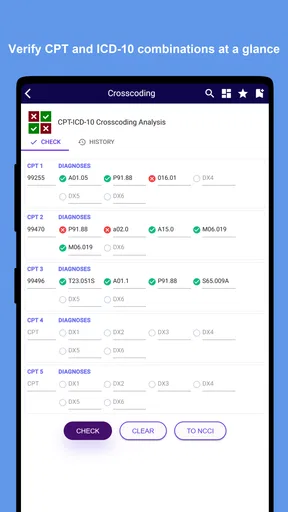
Another benefit is conceptual rather than technical: the app encourages users to think across connected coding categories. A procedure may need to be considered alongside a diagnosis, a supply, or a medication product. Having those subject areas represented together can prompt a more complete review of the record instead of stopping at the first familiar code family.
However, the app will not make an ambiguous note clear. If the documentation does not establish the exact service, diagnosis, site, encounter details, or product, a reference cannot fill in those gaps responsibly. This is one of the most important limitations for new users. The app can help identify terminology, but it cannot turn incomplete documentation into a defensible coding decision.
I also see a learning curve for people who do not already understand the difference between code systems. A beginner may recognize a matching word and assume the result is interchangeable with another code type. For that audience, a structured course, official manual, or supervised coding environment may be a better primary resource. This app makes more sense as a companion once the basic distinctions are familiar.
Three practical habits that improve the experience
First, I would begin every search by identifying the task, not just the word. Ask whether you are looking for a diagnosis, a professional service, an inpatient procedure, a supply, a medication product, or a valuation reference. This small pause reduces the chance of searching the wrong section and mistaking a plausible result for the correct one.
Second, I would record the source context whenever a lookup affects billing. Note the wording from the documentation, the section searched, and the reason the selected entry appears relevant. That habit is useful when another person reviews the claim later. It also exposes cases where the app provides several close possibilities and a separate policy or official reference is needed.
Third, I would use the app for discovery and cross-checking rather than as the only authority. For example, a user might locate a likely orthopedic procedure entry, inspect the related diagnosis language, and then verify the final choice using the organization’s current coding guidance. This workflow preserves the app’s speed without giving a mobile reference more authority than it deserves.
A fourth habit is to treat NDC and lab-fee searches as context-sensitive work. Product identifiers and fee information can be especially vulnerable to confusion when names, package details, or billing circumstances differ. I would confirm the exact item and the applicable billing context before transferring anything into a claim or payment record.
Who is likely to get the most value
I think the best audience includes medical billers, coders, practice administrators, orthopedic-office staff, laboratory billing teams, and healthcare students who need a portable reference while learning how the systems relate. It may also suit professionals who already use a formal coding platform but want a convenient secondary lookup tool when they are not at their usual desk.
The app is less suitable for patients, caregivers, and general users trying to decode a medical bill without professional guidance. The presence of ICD, CPT, HCPCS, RVU, and NDC material does not automatically make the information easy to interpret. A patient disputing a charge would usually benefit more from contacting the provider, insurer, or a qualified billing adviser who can consider the complete claim.
Small practices may find the free installation appealing because it allows a low-risk trial. Yet a practice should consider consistency before adopting it widely. If several staff members are coding the same types of claims, a shared official reference and a documented internal process may be more important than giving everyone a separate mobile tool.
Students should also set realistic expectations. The app can help reinforce vocabulary and show how different reference areas sit beside one another, but it should not be treated as a substitute for instruction. Learning why a code is appropriate is more valuable than memorizing where a matching term appears.
How it compares with usual alternatives
The usual alternatives are official code books, subscription-based coding platforms, payer portals, employer-provided systems, and general web searches. Compared with a printed manual, this app is more portable and potentially faster for a targeted lookup. Compared with a broad web search, its subject focus may reduce irrelevant results and keep the user within recognizable medical coding categories.
Dedicated professional platforms generally have an advantage when the user needs a full workflow, frequent updates, detailed guidelines, auditing support, or integration with existing billing processes. A printed or official reference may be preferable when authority, stable documentation, and formal review matter more than convenience. The app’s role is strongest between those extremes: more focused than casual searching, but not something I would automatically place above a professional coding system.
Its multi-topic design is also a reason to compare carefully. If your work is limited to one code set, a specialized reference may be easier to learn and more efficient. If you routinely move among CPT-4, ICD-10-CM, HCPCS, NDC, and related material, the broader scope becomes more attractive. The right choice depends less on the app’s feature count than on how often your actual work crosses those boundaries.
The public response is encouraging but still modest in scale: the app holds a 4.3 average from around forty ratings and has six written reviews, with over ten thousand installs. I read that as a sign of interest rather than definitive proof that it will fit every professional workflow. The numbers are useful context, but the specialized nature of the app makes personal testing more informative than popularity alone.
My final recommendation
I would recommend trying it if you need a portable medical coding reference and regularly work across more than one of the included areas. The free installation makes that trial practical, and the combination of CPT-4, RVU, ICD-10-CM, ICD-10-PCS, HCPCS, orthopedic, laboratory-fee, and NDC material gives it a distinct purpose. For the right user, the convenience of starting research in one place can be worthwhile.
I would skip it as a primary resource if you need authoritative end-to-end coding guidance, claim integration, extensive audit tools, or a beginner-friendly explanation of medical terminology. I would also be cautious about paying for the higher-priced in-app items until the free experience has proven useful in your own workflow. The purchase makes the most sense for frequent professional use, not occasional curiosity.
My bottom line is that this is a specialized companion rather than a complete replacement for established coding resources. Its value comes from concentration and convenience, while its main risk is encouraging users to treat lookup as final judgment. Used thoughtfully—search first, interpret the documentation, then verify the decision—iCoder CPT RVU ICD10 HCPCS NDC can be a practical addition for medical administrative work. It is worth testing for coders and billing teams, but not a universal recommendation for everyone who encounters a medical code.
Verdict
Strengths of iCoder CPT RVU ICD10 HCPCS NDC
- Combines CPT, RVU, ICD-10, HCPCS, and NDC references in one app.
- Useful for quick code lookups during clinical or billing workflows.
- May reduce the need to switch between multiple medical reference tools.
- Search-focused design can help locate codes faster than printed manuals.
- Helpful for students and healthcare staff learning coding terminology.
Limitations of iCoder CPT RVU ICD10 HCPCS NDC
- Medical code sets may require updates to remain accurate and current.
- Some entries or features may be limited without a paid upgrade.
- The interface can feel dense for users unfamiliar with coding systems.
- Search results may require exact terms or codes for the best matches.
- It should support, not replace, official coding guidance and payer policies.
Similar Picks in This Category
View All
WebMD: Symptom Checker
WebMD, LLC4.1

Microphone Amplifier
DOSA Apps4.2

Anatomy Learning - 3D Anatomy
3D Medical OU4.5

Period Tracker and Calendar
SimpleInnovation4.9

GoodRx: Prescription Coupons
GoodRx4.8

CVS Health
CVS Pharmacy4.5
Frequently Asked Questions
What is iCoder CPT RVU ICD10 HCPCS NDC used for?
iCoder CPT RVU ICD10 HCPCS NDC is a medical coding reference app designed to help healthcare professionals, medical billers, coders, students, and related staff quickly look up common coding systems. It brings together information associated with CPT procedure codes, RVU values, ICD-10 diagnoses, HCPCS codes, and NDC drug identifiers, making it useful for research, study, documentation, and everyday coding reference tasks.
Does iCoder include complete and current CPT, ICD-10, HCPCS, RVU, and NDC information?
The app may provide a broad collection of coding references, but users should not automatically assume that every entry is complete, official, or updated for the current billing year. Medical code sets and reimbursement values change regularly, and coverage rules can vary by payer. Before submitting claims or making clinical or financial decisions, verify important information through official sources and current payer documentation.
Can iCoder be used by professional medical coders and healthcare organizations?
Yes, iCoder can be a convenient supplementary reference for professional coders, physicians, billing teams, students, and healthcare administrators. Its search-oriented format may save time when checking terminology or comparing code categories. However, it should be treated as a reference tool rather than a replacement for certified coding guidance, payer policies, compliance procedures, encoder software, or advice from a qualified coding and billing specialist.
Does iCoder CPT RVU ICD10 HCPCS NDC work offline?
Offline availability depends on how the application stores its coding database and on the version installed on your Android or iOS device. Some reference features may remain accessible without an internet connection, while updates, external links, advertisements, or synchronized content may require connectivity. It is best to test the main search functions after installation and check the app listing for specific offline and update-related details.
Is iCoder CPT RVU ICD10 HCPCS NDC free to download and safe to use?
The application may be available as a free download, although pricing, advertising, optional purchases, and supported features can differ between platforms and versions. Download it only from a reputable official app store, review the requested permissions, and read the privacy policy before entering any information. Because coding references can affect reimbursement and compliance, independently confirm critical results before relying on them professionally.
